
Knowing exactly what equipment your business has should be simple.
But as businesses grow, it can become increasingly difficult to keep track of tools, vehicles, machinery, safety gear and other important items.
Information ends up spread across spreadsheets, paper records, folders and the knowledge of individual team members. This can make it difficult to answer some fairly basic questions:
That is why we have introduced the EZICHEQ Free Plan.
It gives businesses a simple way to start building a live digital asset register, improve visibility and keep important item information together in one place—at no cost.
The EZICHEQ Free Plan is designed for businesses that want an easier way to record and manage the items they rely on every day.
You can use it to create a central register for your:
Instead of relying on separate spreadsheets or paper-based records, your team can access one clear source of information.
The Free Plan includes unlimited items, unlimited users and unlimited basic checks, giving you room to build a register that reflects the needs of your business.
.png)
The first benefit of an asset register is simply knowing what your business owns and manages.
EZICHEQ allows you to add items individually and record the information that matters to your business.
This could include:
You can also mark an item as lost, stolen, out of service or decommissioned while keeping its previous information and history available for your records.
This gives you a clearer picture of the equipment across your business and creates a more reliable record for operational, maintenance and insurance purposes.
The first step when setting up EZICHEQ is creating your Item Types.
Item Types are the categories that keep your register organised, particularly when you begin adding larger numbers of similar items.
Depending on your business, your Item Types could include:
Keeping similar items together makes your register easier to search, filter and manage. It also creates the foundation for assigning relevant information, instructions, alerts and checks to groups of similar items.
Equipment regularly moves between worksites, vehicles, storage areas, team members and customers.
EZICHEQ allows you to assign a physical address to an item or use the geolocation feature on a smartphone or smart device to pin its location.
This gives your team a clearer record of where an item was last located and makes it easier to keep information updated as equipment moves around the business.
It can be particularly useful for companies managing equipment across multiple jobsites or locations.
You do not need to introduce a full inspection or compliance system to start receiving value from EZICHEQ.
The Free Plan can be used simply as a digital register.
You can begin by adding your most important tools, vehicles, safety equipment or high-value assets. This gives you one place to record what you have and organise the information associated with each item.
There is also no need to enter everything at once.
Start with one Item Type and a few important items. Your register can grow gradually as your team becomes familiar with the system.
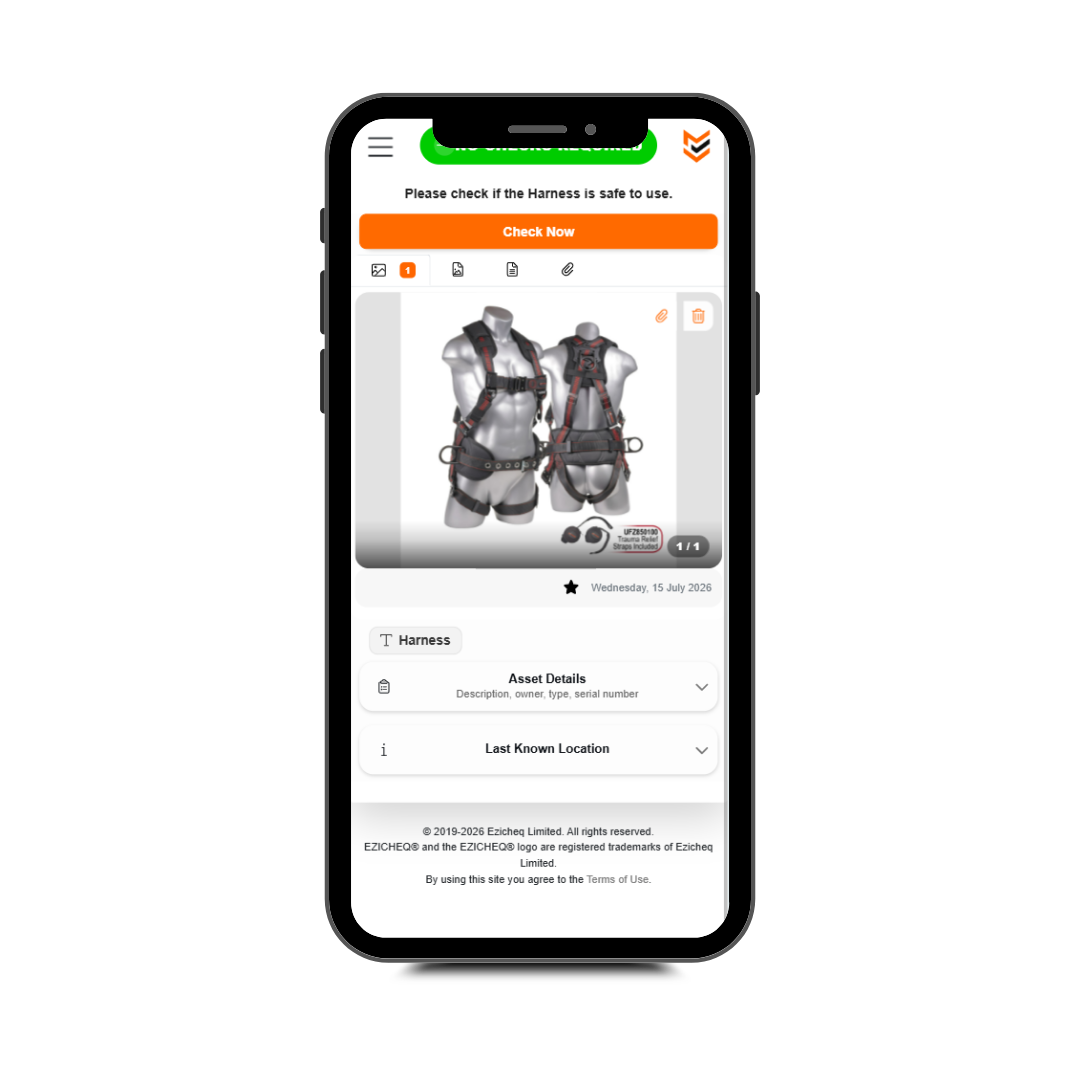
Businesses that want to complete digital checks can purchase EZICHEQ smart labels and connect them to the physical items in their register.
Each label contains a QR code that can be scanned using a smartphone.
Once linked to an item, scanning the label makes it easy for your team to:
EZICHEQ is web-based, so users can scan and access item information through their device’s browser without needing to install a separate app.
Smart labels are optional and are purchased separately. You only need them when you are ready to connect your physical equipment to its digital record and begin completing checks.

The EZICHEQ Free Plan includes a simple preset check that allows your team to answer:
Is this item fit for purpose?
This provides an easy way to record the current status of an item and identify equipment that may need attention.
Once a check is submitted, the result is stored against the item, helping you create an ongoing digital history.
While this is a simple check, it is an important first step towards creating better equipment records and encouraging everyone in the business to take responsibility for keeping item information current.
Equipment and safety management should not sit entirely with one person.
The people using your tools, vehicles and equipment are often best placed to update their locations, add information and complete the required checks.
That is why the EZICHEQ Free Plan includes unlimited users.
You can invite the people who:
Giving your team access helps keep your register accurate and removes the pressure of one person having to manage everything alone.
The Free Plan is suitable for any business that needs a better way to record and manage its equipment.
It may be particularly useful for:
Whether you manage ten items or several hundred, the Free Plan gives you a practical place to start.
Setting up your asset register does not need to be complicated.
Start with these five steps:
You can then continue adding items and information as your register grows.
You cannot manage what you cannot see.
A clear asset register gives your business better visibility over what you have, where it is and its current status.
The EZICHEQ Free Plan gives you a simple and affordable place to begin, with no subscription cost, unlimited items and unlimited users.
Whether you need a straightforward asset register or want to begin creating digital check records, you can get started at a pace that works for your business.
Build your free asset register with EZICHEQ today.
From the latest news to expert tips and tricks, our blogs cover a wide range of topics designed to inform, inspire, and empower you and your business.



.png)
.png)