
Most businesses rely on more equipment than they realise.
Tools, vehicles, machinery, safety equipment, buildings and specialist assets all play a part in keeping daily operations moving. As a business grows, however, it becomes harder to keep track of everything. A tool is moved to another site. A vehicle changes hands. A safety inspection becomes overdue. A maintenance record is saved in the wrong folder. Before long, no one is completely certain what the business owns, where it is or whether it is ready to use.
An asset register provides the structure needed to manage this information properly. It gives the business one central record of its assets and helps answer five important questions:
Who is responsible for it?
What do we have?
When was it last checked or serviced?
Where is it now?
Why is it in its current condition or status?
When those answers are easy to find, an asset register becomes much more than a list. It becomes an important part of equipment management, operational planning and safety compliance.
.png)
An asset register is a central record of the physical items a business owns, uses or manages.
Depending on the organisation, this could include:
- Tools and equipment
- Vehicles and trailers
- Plant and machinery
- Safety equipment
- Harnesses and height-safety gear
- Buildings and facilities
- Jobsites and temporary structures
- Computers and electronic devices
- High-value or specialist assets
- Client-owned equipment
A basic register may record an item’s name, serial number and purchase date. A well-functioning digital asset register goes further. It connects each item with its current location, assigned user, operational status, inspection history, maintenance records, photos and supporting documents. That additional context allows the business to manage an asset throughout its working life rather than simply record that it exists.
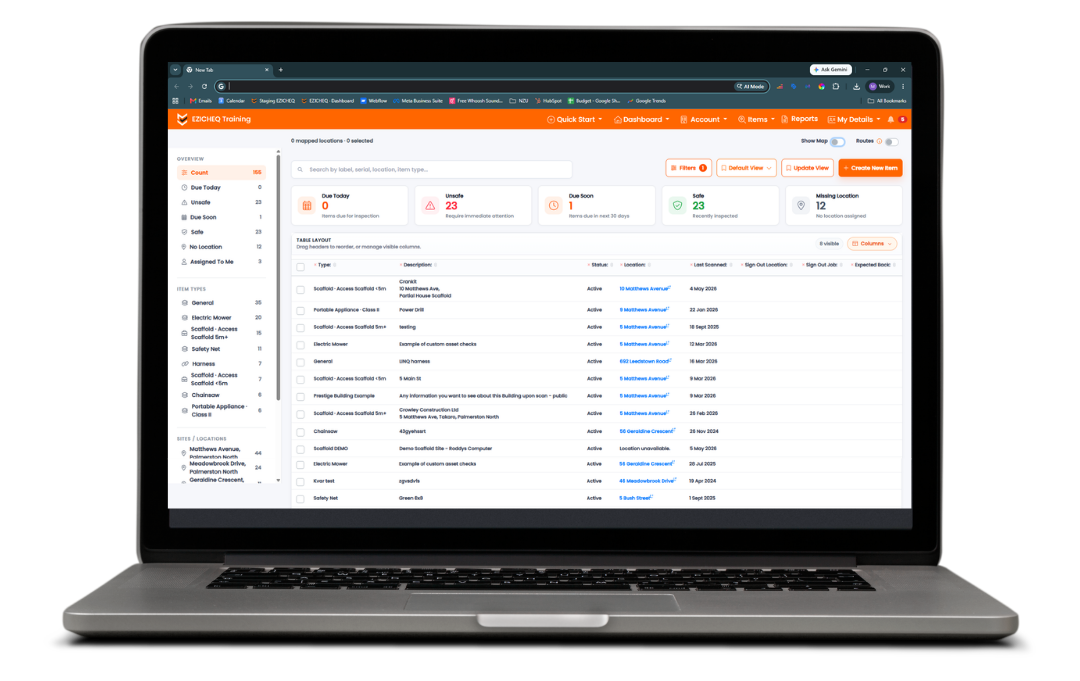
The first benefit of an asset register is visibility. Without a central record, equipment can easily be forgotten, duplicated or misplaced. Businesses may purchase a replacement item even though suitable equipment is already available at another site or sitting unused in storage. An accurate register helps managers understand what the business owns, what is currently available and what may need attention.
Each record should contain enough information to clearly identify the asset. This may include:
- A unique asset or item number
- Make, model and serial number
- Asset category or Item Type
- Photos
- Purchase or ownership details
- Current status
- Instructions and user guides
- Certificates and documentation
The information required will vary depending on the asset. A company vehicle may need registration, servicing and prestart records, while a harness may need certification details, inspection history and photographic evidence. The goal is not to collect unnecessary data. It is to make the information people regularly need easier to find.
Equipment management rarely sits with one person. Employees use the equipment. Supervisors manage its availability. Health and safety teams oversee inspections. Maintenance staff complete servicing and repairs. A reliable asset register helps connect these responsibilities. It can show who currently has an item, who last inspected it, who changed its status and who needs to take the next action.
This creates accountability without forcing one manager to chase every update manually.
It can also help businesses manage worker competency. Some equipment should only be used or inspected by people with the appropriate training or certification. Connecting user qualifications with equipment and inspection requirements helps ensure the right people are completing the right tasks.
EZICHEQ’s Premium features include unlimited users, user certifications and the ability to build and assign checklists, allowing more of the team to contribute to equipment and inspection management.
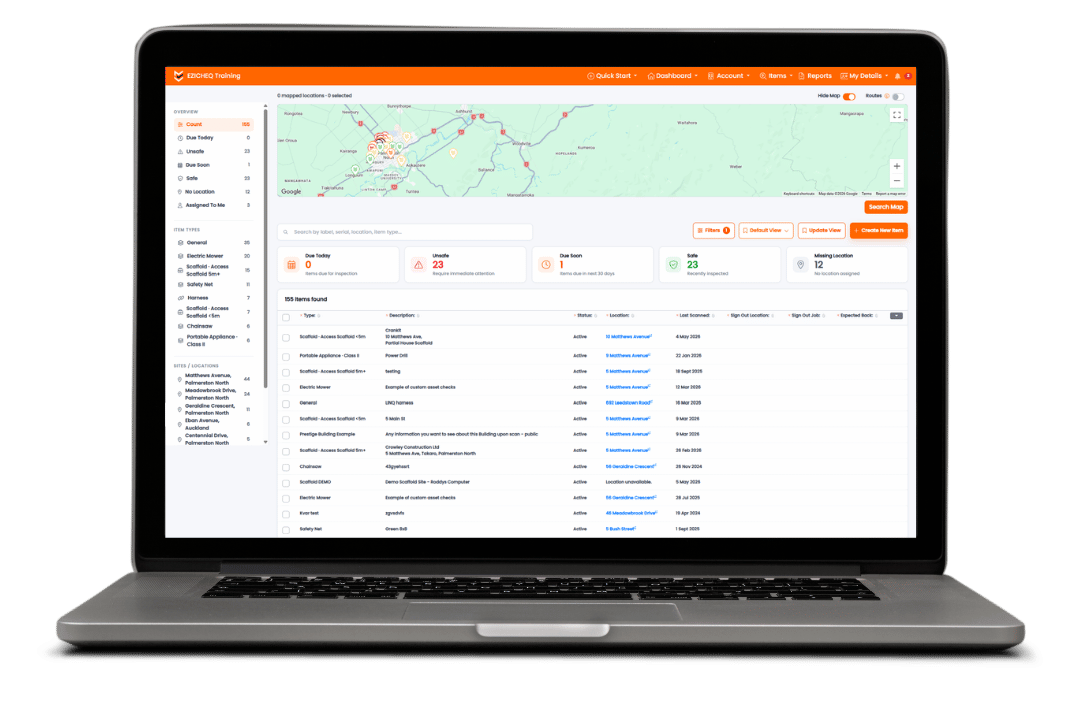
Knowing that the business owns an item is only useful if people can also find it. Equipment regularly moves between jobsites, vehicles, workshops, clients, storage facilities and employees. When those movements are not recorded, teams can waste valuable time calling around or travelling to the wrong location. A digital asset register can provide a last-known location and a record of where the asset is assigned.
Depending on the equipment and the business, asset tracking may involve:
- An assigned address or jobsite
- A branch, division or client
- Smartphone geolocation
- GPS asset tracking
- Sign-in and sign-out records
- QR code asset tracking
- A visual map of asset locations
The level of tracking should match the value and mobility of the item. A fixed piece of machinery may only require an assigned location, while frequently moved or high-value equipment may benefit from more detailed tracking. Asset tracking software gives managers greater oversight without requiring them to physically visit every site.

Assets change over time. They are moved, used, inspected, damaged, repaired and eventually taken out of service. A good register should preserve that history. Instead of relying on memory, managers should be able to see when an item was last inspected, when its next service is due and whether an identified issue has been resolved. This is where an asset register begins to support asset lifecycle management.
The register can follow an item from the moment it is purchased or commissioned through to its eventual decommissioning. Along the way, it can retain:
- Inspection dates
- Service and maintenance records
- Status changes
- Location updates
- Repairs
- Photos
- Notes
- Supporting documents
- Decommissioning details
Alerts and reminders can make this process more proactive. Rather than waiting for someone to notice that a check has been missed, the system can highlight upcoming or overdue work. EZICHEQ Premium includes dashboards, alerts and reminders, insights and reporting features that help businesses monitor checks and asset information more closely.
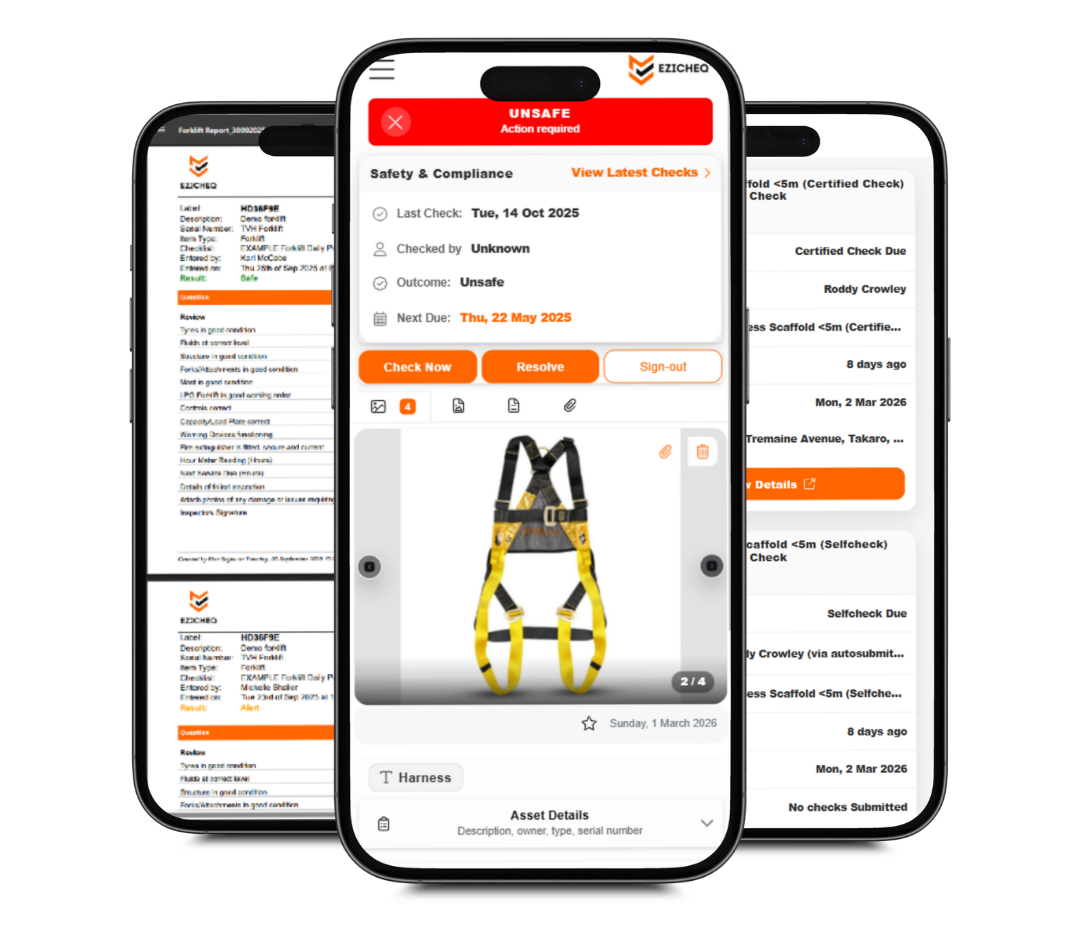
Knowing that an item has failed or been taken out of service is important, but the status alone does not explain what happened. Managers may also need to understand why the item failed, what evidence was provided and what action is required next. Photos, notes, inspection responses and supporting documents provide that context.
For example, instead of simply marking a ladder as unsafe, the record may show a damaged rung, a photograph of the issue, the person who identified it and the date it was removed from service.
That information helps the business respond appropriately and creates a clearer digital audit trail. It also reduces the risk of an unsafe item returning to use without the issue being properly addressed.
The value of an asset register is not limited to knowing what the business owns. It can influence how efficiently the business operates, how safely equipment is managed and how confidently decisions are made.
A live register gives managers a clearer view of what is happening across the business. They can see which assets are available, which are currently in use and which require attention. This is especially valuable for businesses operating across several sites, regions or teams. Rather than relying on phone calls and spreadsheets, management can work from a shared source of information.
Important asset information is often needed at short notice. A client may request evidence of an inspection. A manager may need to investigate an equipment failure. An insurer may ask for details about a lost or damaged item. When photos, documents and inspection records are stored against the relevant asset, the information is easier to retrieve and understand.
An accurate register helps businesses make more informed purchasing and replacement decisions. Before buying more equipment, managers can review what is already available, what is being underused and which assets are repeatedly failing or requiring repair. This can reduce unnecessary purchases and help the business plan future investment based on actual equipment history.
Missing or unsafe equipment can delay work. An asset register helps teams find equipment sooner and identify problems before the asset is required for an important job. When checks, servicing and repairs are visible, the business can take a more proactive approach to equipment availability.
An asset register tells the business what an item is. Digital inspections help show what condition it is in. Connecting inspections directly to the asset creates a more accurate and useful record. Different equipment requires different checks. A vehicle prestart should not use the same checklist as a harness inspection, scaffold handover or machinery service. Digital inspection software allows businesses to build checklists around the specific risks and requirements of each asset type.
A digital inspection may include:
- Mandatory questions
- Multiple-choice answers
- Conditional logic & diagnostic style questions
- Pass / fail outcomes
- Photos
- Notes
- Signatures
- Dates and timestamps
- Location information
Once completed, the inspection is stored against the item. This creates an ongoing record of its condition and provides evidence of what was checked.
It also removes the separation that often exists between paper inspection forms and the physical equipment they relate to. Instead of searching through filing cabinets or folders, the business can open the item and review its check history.
EZICHEQ Premium allows businesses to build and assign checklists, add photos and documents, complete unlimited checks and create reports from the information collected.
An asset register does not make a business compliant on its own. It does, however, provide the structure needed to manage inspections, maintenance, certifications and supporting evidence more consistently.
A strong compliance management system can help a business:
- Assign the correct checks to each asset
- Schedule recurring inspections
- Identify overdue requirements
- Record failures and corrective actions
- Store evidence of completed work
- Monitor user certifications
- Produce inspection and compliance reports
- Retain an asset’s history after it is decommissioned
This is particularly important in high-risk industries where businesses may need to demonstrate that equipment has been inspected, maintained and used by appropriately trained people.
When records are complete and easy to retrieve, the business is better prepared for audits, client requests and internal reviews.
The value lies not only in proving that a check occurred, but in showing who completed it, when it happened, what was found and what action followed.
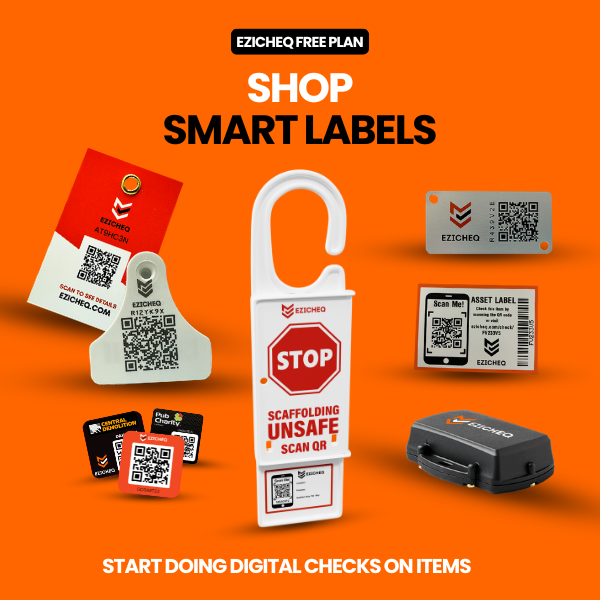
QR code asset tracking creates a direct link between a physical item and its digital record. A unique smart label is attached to the asset. When someone scans the QR code with a smartphone, they can be taken directly to the correct item.
Depending on their access, they may be able to:
- View asset information
- Check its current status
- Update its location
- Add notes and photos
- Open stored instructions or documents
- Complete the required inspection
- Review previous check details
This makes it easier for employees to update information where the equipment is actually being used. It also reduces the risk of someone opening or inspecting the wrong item in a large asset register.
Asset management software should do more than replace a spreadsheet. It should make the register easier to access, update and use as part of everyday work.
A practical system should allow a business to:
- Create and organise a digital asset register
- Categorise similar items
- Record item locations and status
- Store photos and documents
- Build and assign digital inspections
- Schedule alerts and reminders
- Manage user certifications
- View dashboards and insights
- Produce custom reports
- Retain an asset’s full history
The best system is one that people will actually use. If updating an item is difficult, the register will quickly become outdated. If information is easy to access from a phone, workshop or jobsite, the register is more likely to remain accurate. EZICHEQ’s Premium Plan combines an unlimited asset and item register with unlimited users and checks. It also includes custom checklist building and assignment, photos and documents, dashboards, alerts, user certifications, insights, custom reporting, status terminology, route planning and checklist templates.
An asset register should not be created once and then forgotten. It should form part of the way equipment is purchased, issued, moved, inspected, repaired and eventually decommissioned.
Its real value comes from answering five questions clearly:
When that information is available, businesses gain better visibility, stronger accountability and greater confidence in their equipment records. A platform such as EZICHEQ helps connect asset management, equipment tracking, digital inspections and compliance management within one system. Features such as smart labels, custom checklists, map views, reminders, photos, documents, dashboards and reports help turn a basic asset list into a live operational tool. Because knowing what you have is only the starting point. A well-functioning asset register helps you understand where your equipment is, what condition it is in, who is responsible for it and what needs to happen next.
From the latest news to expert tips and tricks, our blogs cover a wide range of topics designed to inform, inspire, and empower you and your business.



.png)
.png)